🎁 Module Overview
In this tutorial, we'll learn how to create and manage discount schemes (scholarships, sibling discounts, etc.) to provide structured and transparent fee reductions.
The Fee Discounts module allows schools to define various discount schemes that can be applied to student fees. This supports policies like sibling discounts, staff concessions, scholarships, and early payment incentives in a consistent and automated manner.
🧭 How to Access
Navigate to: Finance → Fee Discounts
📐 Understanding Discounts
Fee discounts specify a reduction to be applied to a student's fees. They can be:
Percentage-based (e.g., 10% off all fees)
Fixed amount (e.g., $50 or ₦120,000 off tuition)
Applicable to all fee categories or only specific ones (e.g., Tuition only)
🎯 Common Discount Types & Examples
| Discount Type | Typical Value | Use Case |
|---|---|---|
| Sibling Discount | 10% - 15% | Applied for families with multiple children enrolled. |
| Staff Child Discount | 50% - 100% | Concession for children of school employees. |
| Scholarship | 50% - 100% | Awarded based on merit or need. |
| Early Payment Discount | 5% - 10% | Incentive for paying fees before the due date. |
| Bulk Payment Discount | Fixed Amount | Discount for paying the full year's fees upfront. |
📋 Fee Discounts List Overview
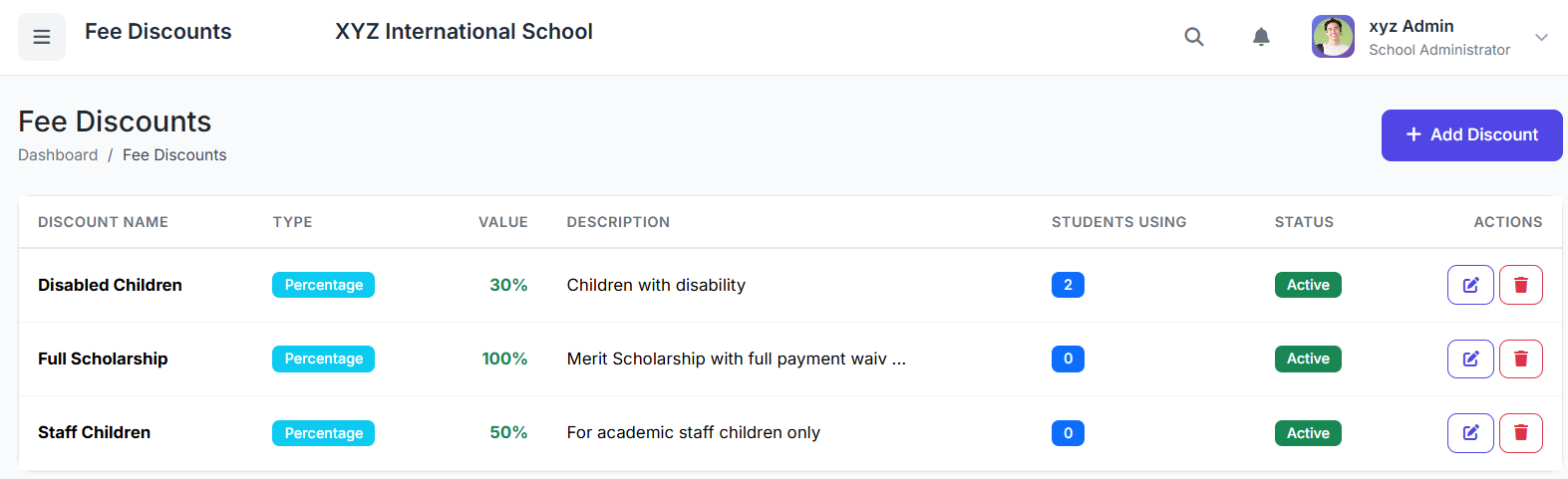
The main page displays all configured discounts. Key columns include:
| Column | Description |
|---|---|
| Discount Name | Identifiable name (e.g., "Sibling Discount"). |
| Type | Percentage (%) or Fixed Amount. |
| Value | The discount figure (e.g., 10 or 50). |
| Applies To | All fees or specific categories. |
| Status | Active or Inactive. |
| Actions | Edit or Delete. |

➕ Creating a New Discount
Click Add Discount.
Fill in the form:
Discount Name: (e.g.,
Sibling Discount)Discount Type: Select Percentage or Fixed Amount.
Value: Enter the number (e.g.,
10for 10%, or50for $50 or 120000 for ₦120, 000).Applies To: Choose All Fee Categories or select specific ones.
Description: (Optional) Define eligibility rules or notes.
Status: Set to Active.
Click Create Discount.

👤 Applying Discounts to Students
Discounts are applied in two primary ways:
During Fee Assignment: When generating or assigning fees to a student, select the applicable discount from a dropdown. The system automatically calculates the reduced amount.
Post-Assignment: Edit an existing student's fee record, select or change the discount, and the system recalculates the balance instantly.
⚙️ Managing & Updating Discounts
Editing: Update a discount's value, type, or applicability at any time by clicking Edit.
Deactivating: Instead of deleting a discount, change its status to Inactive. This:
Preserves it in historical records of students who received it.
Prevents it from being used for new assignments.
Maintains financial report accuracy.

✅ Best Practices
Define Clear Rules: Document eligibility criteria for each discount (e.g., "Applies to 2nd and 3rd siblings only").
Annual Policy Review: Review discount schemes each academic year to ensure they align with the school's financial health and policies.
Monitor Impact: Use financial reports to track the total cost of discounts awarded and assess their impact.
Communicate Transparently: Ensure parents understand available discounts and how to qualify for them.
The Fee Discounts module provides a powerful and fair way to implement fee reductions, supporting families and school policies while maintaining clear financial records and automated calculations.
Next, we will cover the Fee Invoices & Payments process.