🏗️ Module Overview
In this tutorial, we'll learn how to assemble Salary Components into a complete pay package for each staff member, defining their gross pay, deductions, and net salary.
A Salary Structure is the complete earnings and deductions profile for a staff member. It combines pre-defined Salary Components (like Basic Salary, Allowances, Taxes) to calculate an individual's Gross Salary, Total Deductions, and final Net Salary (take-home pay).
🧭 How to Access
Navigate to: Salary → Salary Structures
📋 Salary Structures List Overview
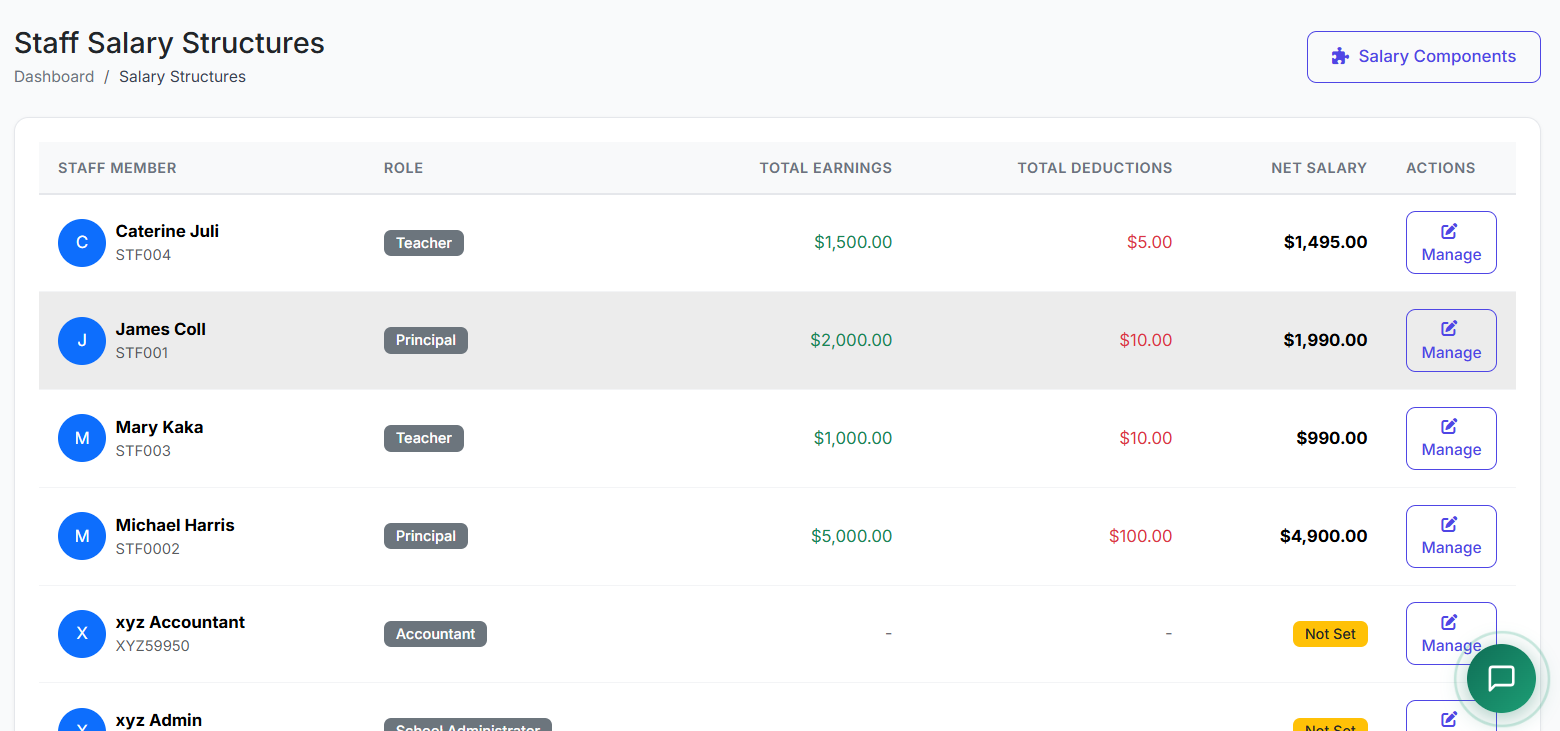
The main page lists all staff with configured salary structures. Key columns include:
| Column | Description |
|---|---|
| Staff Name / ID | Employee identification. |
| Department | Staff's department (e.g., Teaching, Admin). |
| Gross Salary | Total earnings before deductions. |
| Total Deductions | Sum of all deductions. |
| Net Salary | Final take-home pay (Gross - Deductions). |
| Status | Active, Inactive, or Pending. |
| Actions | View or Edit the structure. |

➕ Creating a Salary Structure
Method 1: Create for a New Staff Member
Click Create Structure.
Select the Staff Member from the list.
Add Earning Components:
Select a component (e.g., Basic Salary).
Enter its Value (Fixed Amount or Percentage).
Repeat for all earnings (House Allowance, Transport, etc.).
Add Deduction Components:
Select a deduction (e.g., Income Tax, Pension).
Enter its Value (Fixed Amount or % of Basic/Gross).
System Auto-Calculates:
Gross Salary (Sum of all Earnings).
Total Deductions (Sum of all Deductions).
Net Salary (Gross - Deductions).
Review and click Save Structure.
Method 2: Edit or Assign from Staff Profile
You can also create or modify a structure directly from a staff member's profile under the Salary section.

📊 Example Salary Structure Breakdown
| Component | Type | Calculation | Amount |
|---|---|---|---|
| Basic Salary | Earning | Fixed Amount | $2,000 |
| House Allowance | Earning | 20% of Basic | $400 |
| Transport Allowance | Earning | Fixed Amount | $200 |
| Medical Allowance | Earning | Fixed Amount | $100 |
| Gross Salary | Total Earnings | $2,700 | |
| Income Tax | Deduction | 15% of Gross | $405 |
| Pension | Deduction | 5% of Basic | $100 |
| Total Deductions | $505 | ||
| Net Salary (Take-Home) | Gross - Deductions | $2,195 |
✏️ Editing an Existing Structure
Find the staff member in the list.
Click Edit.
Adjust component values, add new components, or remove existing ones.
Save. Changes typically take effect from the next payroll cycle.
✅ Best Practices
Complete Setup First: Ensure all staff have a salary structure before processing any payroll.
Annual Review: Review and update all salary structures annually during budget planning.
Document Exceptions: Clearly document any special arrangements or one-off adjustments in the structure's notes.
Maintain History: The system should maintain a version history of salary changes for audit and transparency.
Communicate Changes: Inform staff of any changes to their salary structure before the affected pay period.
The Salary Structures module translates your compensation policy into precise, individualized pay calculations, ensuring accuracy, transparency, and efficiency in payroll management.
Next, we will demonstrate the Payroll Processing and Payslip Generation steps.